
What Is Mobile-First Indexing? A 2026 SEO Guide for Businesses
Mobile-first indexing means Google crawls, indexes, and ranks your website using its mobile version. Google completed its move to this system in July 2024, so Googlebot Smartphone is now the crawler Google uses for indexing websites. If your mobile pages lack content, structured data, or links that your desktop pages have, Google may never see them. Your mobile site is effectively your site, and its content, speed, and usability decide your rankings on every device.
Key Takeaways
- Mobile-first indexing is no longer a rollout. Google finished the transition in July 2024, and sites that cannot be accessed on mobile can no longer be indexed.
- There is still one index. What changed is which version of your page feeds it.
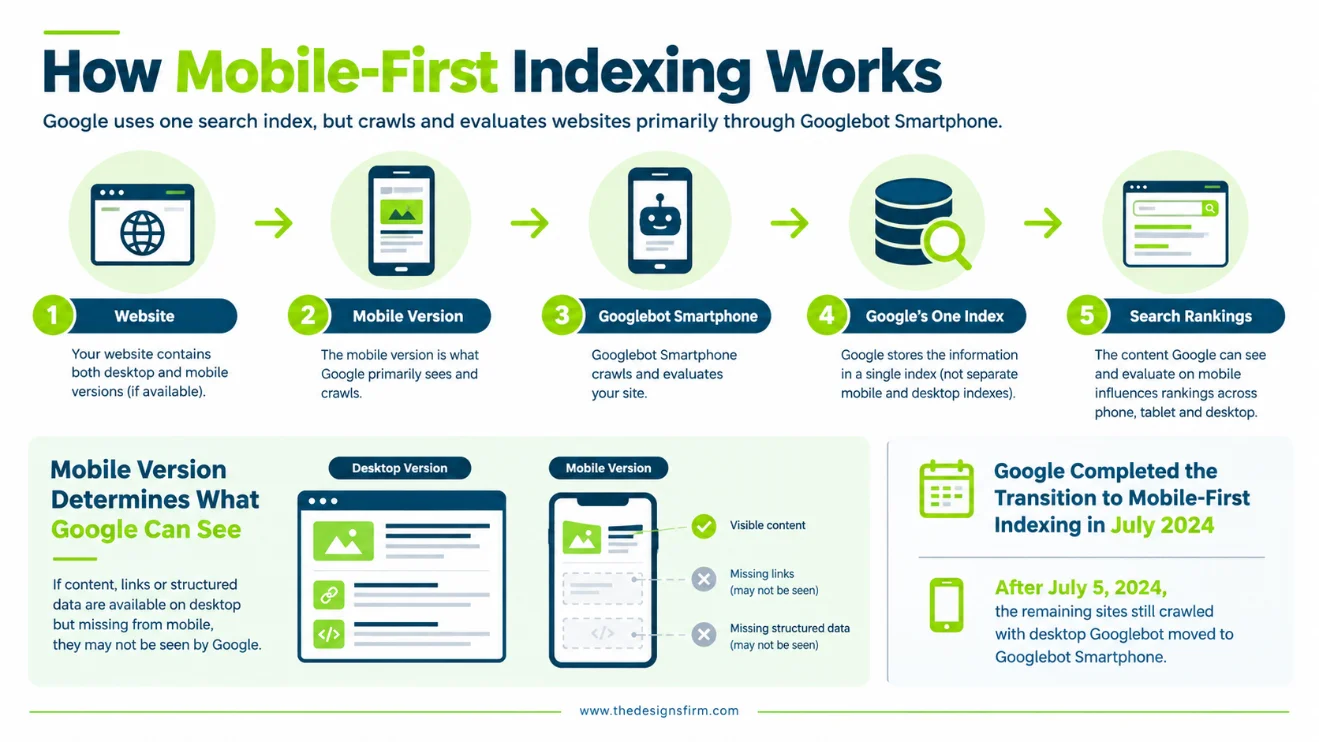
- Anything missing from your mobile version, including text, links, and structured data, is missing from Google’s view of your page.
- Core Web Vitals are the practical way to measure mobile experience, and only 48% of mobile websites pass all three.
- Several tools older guides recommend, including the Mobile-Friendly Test, no longer exist.
Table of Contents
How Mobile-First Indexing Works
Google does not keep a separate mobile index and desktop index. It keeps one index, and it fills that index by crawling your pages as a smartphone user would.
Google announced the final step of this migration in June 2024. After July 5, 2024, the small set of sites still crawled with desktop Googlebot moved to Googlebot Smartphone. Google explained that this simplifies its systems and makes device-related issues easier to debug. Googlebot Desktop can still appear in your server logs, because Google sometimes uses it for features such as product listings and Google for Jobs.
The practical rule is simple. Whatever your mobile page shows Googlebot is what Google evaluates for all searches, whether the searcher is on a phone, tablet, or desktop.
Why Mobile-First Indexing Matters for Your Business
It Controls What Google Can Rank
Google advises keeping the same content on mobile and desktop, because that is what allows both versions to rank for the same keywords. When a business trims text, links, or schema from its mobile layout, it quietly reduces the number of queries the page can compete for.
It Shapes Page Experience
Google states that strong page experience can contribute to success in Search. It also states that good Core Web Vitals scores do not guarantee rankings, and that relevance still comes first. Treat speed and usability as a competitive edge, not a replacement for useful content. If you want a wider view of what else influences visibility, our overview of Google ranking factors is a good next read.
Google measures Core Web Vitals at the 75th percentile of real page loads. The current targets are:
- Largest Contentful Paint (LCP): within 2.5 seconds
- Interaction to Next Paint (INP): 200 milliseconds or less
- Cumulative Layout Shift (CLS): 0.1 or less
INP replaced First Input Delay as a Core Web Vital in 2024, so any guide still listing FID is outdated.
Most sites still fall short. The 2025 Web Almanac found that 48% of mobile websites had good Core Web Vitals, up from 36% in 2023. Meeting these targets on mobile puts you ahead of roughly half the web.
It Affects Revenue
Speed problems cost real money. The Indian bus-booking platform redBus improved its INP and increased sales by about 7%. Your results will vary by industry, but the lesson holds: a faster mobile experience supports conversions as well as rankings.
The Mobile-First Indexing Checklist
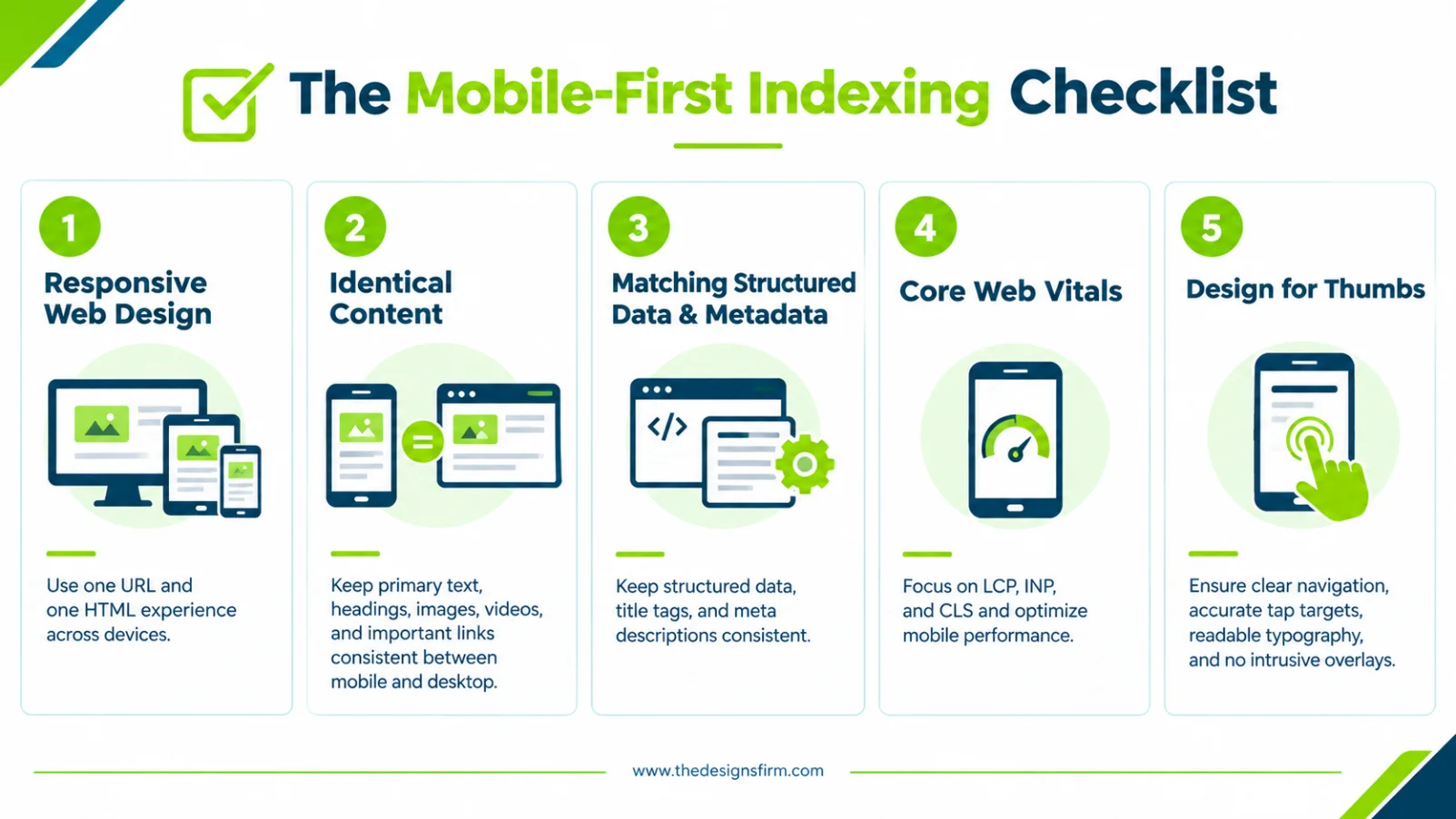
1. Use Responsive Web Design
At The Design Firm, we build on responsive design because one URL and one set of HTML serves every device. That removes the main cause of mobile and desktop mismatches before they start. If you are planning a new site and want it built mobile-first from day one, a custom web development company can set that foundation up properly.
2. Keep Content Identical
Make sure your mobile version carries the same primary content as desktop: body text, headings, images, videos, and important links. Pay special attention to lazy loading. Googlebot does not trigger content that requires interactions such as clicking, typing, or swiping, so primary content should never wait for user action.
3. Match Structured Data and Metadata
Your mobile pages must carry the same structured data as your desktop pages. If your site uses separate mobile URLs, the URLs inside the schema must point to the mobile versions. Google gives the same instruction for video structured data. Our recommendation is to keep title tags and meta descriptions identical across versions as well.
4. Pass Core Web Vitals on Mobile
Start with LCP, the usual weak point. Compress hero images, never lazy-load the largest above-the-fold element, and reduce render-blocking scripts. For INP, break up long JavaScript tasks and audit third-party scripts such as chat widgets and tag managers. For CLS, set explicit width and height on images, iframes, and embeds.
5. Design for Thumbs
- Navigation: Keep menus short and clear.
- Tap targets: Make buttons and links large enough to tap accurately without zooming.
- Typography: Use readable font sizes without pinching.
- Pop-ups: Avoid overlays that cover the main content on small screens.
How to Check Your Site’s Mobile-First Status
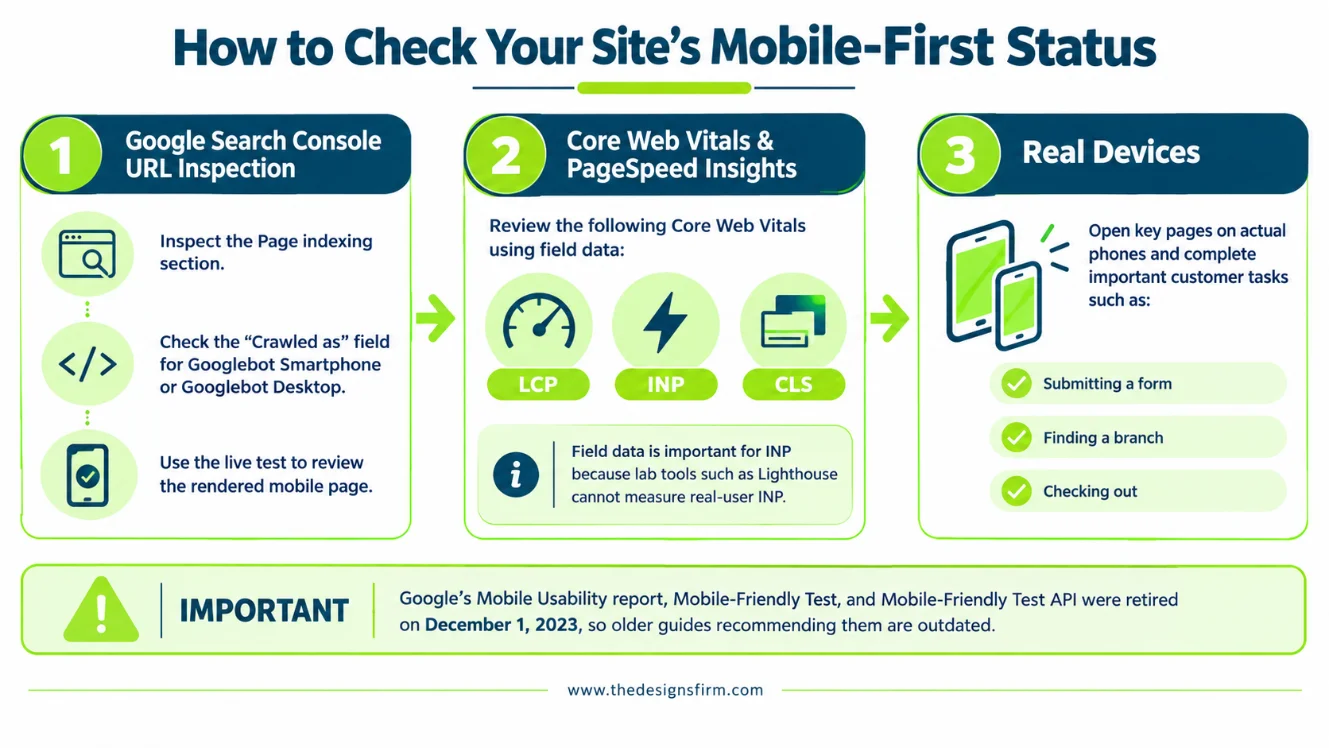
Some tools that older guides recommend are gone. Google retired Search Console’s Mobile Usability report, the Mobile-Friendly Test, and the Mobile-Friendly Test API on December 1, 2023, and redirected the test to Lighthouse. Use the following instead.
Google Search Console URL Inspection
Enter any URL from your property and open the Page indexing section. The “Crawled as” field shows whether Google used Googlebot smartphone or Googlebot desktop. Run the live test to compare the rendered mobile page against what you expect Google to see.
Core Web Vitals Report and PageSpeed Insights
Search Console’s Core Web Vitals report and PageSpeed Insights both show field data for LCP, INP, and CLS. The Search Console report splits URLs by mobile and desktop, which helps you find mobile-only problems. Lab tools such as Lighthouse cannot measure INP, because they run without a real user interacting. Rely on field data for INP. If you are unsure how Search Console fits alongside your analytics setup, our breakdown of Search Console vs Google Analytics explains what each tool is best for.
Real Devices
Open your key pages on actual phones. Complete the tasks your customers complete, such as submitting a form, finding a branch, or checking out. Problems that tools miss usually appear here first.
How We Approach Mobile-First at The Design Firm
We design the mobile experience first, then expand it for larger screens. Our designers, developers, and SEO specialists work from the same mobile-first brief, so content parity, schema, and performance are planned at the start of a project, not patched in after launch. During audits, we compare mobile and desktop rendering page by page and fix any gaps in content, links, and structured data. If your site has crawl or rendering problems you cannot pin down, our technical SEO services in Pakistan are built for exactly that kind of diagnosis.
Conclusion
Mobile-first indexing is now the standard for every site on Google, and your mobile version is what Google evaluates. To protect your visibility, take three steps this week:
- Audit your mobile pages against desktop for missing content, links, and schema.
- Check your Core Web Vitals on mobile and fix LCP first.
- Confirm in Search Console’s URL Inspection that Googlebot smartphone is crawling your key pages.
If you want a technical audit of your mobile setup, our team at The Design Firm can help.