
Best Visual Content Creation Tools: The Ultimate Guide

Visual content creation tools help businesses produce images, videos, infographics, presentations, social media graphics, prototypes, and other digital assets without building every asset from scratch. The right platform depends on what you need to create, how much control you want, and whether your workflow requires AI, collaboration, or brand management. At The Design Firm, we recommend choosing tools based on the job rather than trying to force one platform to handle everything. This guide covers practical options for image design, video, data visualization, branding, UI design, and screen-based content.
Key Takeaways
- The best visual content creation tool depends on your content type, workflow, skill level, and brand requirements.
- Canva and Adobe Express are useful for producing a wide range of branded marketing assets from a single platform.
- CapCut and VEED are strong options for short-form, social, and AI-assisted video production.
- Visme is designed for infographics, reports, presentations, and data visualization.
- Figma is better suited to interface design, prototypes, and collaborative product design, while Loom is useful for screen recordings and visual explanations.
- AI can speed up production, but human review is still essential for accuracy, brand consistency, and quality.
Table of Contents
Why Visual Content Matters in Digital Marketing
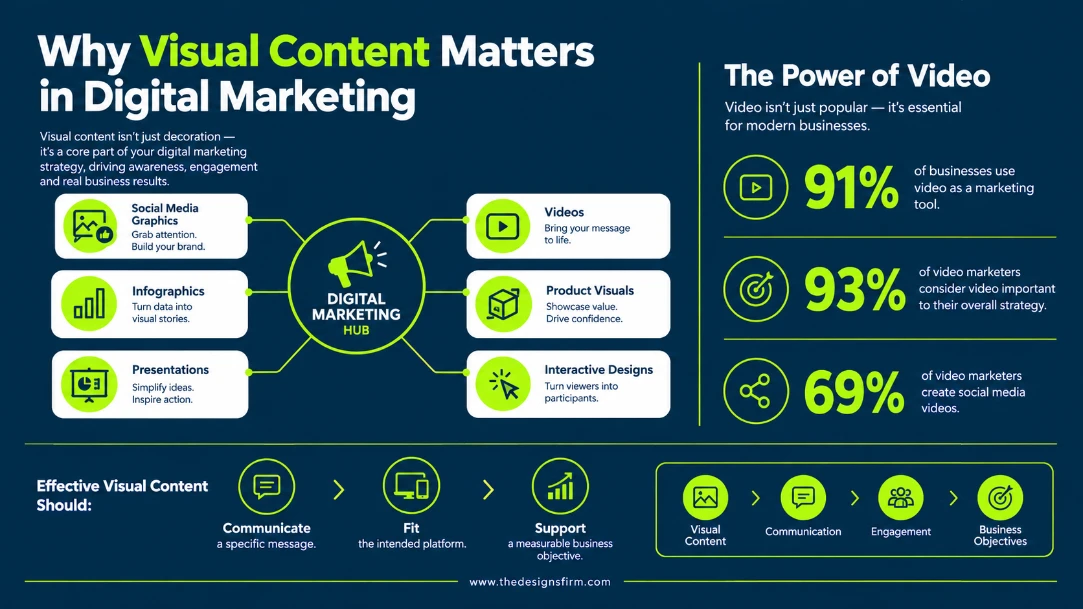
Visual content is no longer limited to decorative graphics. Businesses use images, videos, infographics, presentations, product visuals, and interactive designs to explain ideas, promote products, support sales, and communicate with customers.
Video, in particular, has become a standard part of modern marketing. According to Wyzowl’s 2026 Video Marketing Statistics, 91% of businesses use video as a marketing tool, while 93% of video marketers consider it an important part of their overall strategy. The same research found that 69% of video marketers create social media videos, making them the most common video use case surveyed.
The implication for marketers is straightforward: visual production needs to be part of the content workflow, not an afterthought.
At The Design Firm, we approach visual content from a marketing perspective. A design should not simply look attractive. It should communicate a specific message, fit the intended platform, and contribute to a measurable business objective. If your business struggles to maintain a consistent corporate image across these touchpoints, you can always explore our professional branding services to help establish a solid visual foundation.
How to Choose a Visual Content Creation Tool
Before choosing a platform, define what you actually need to produce.
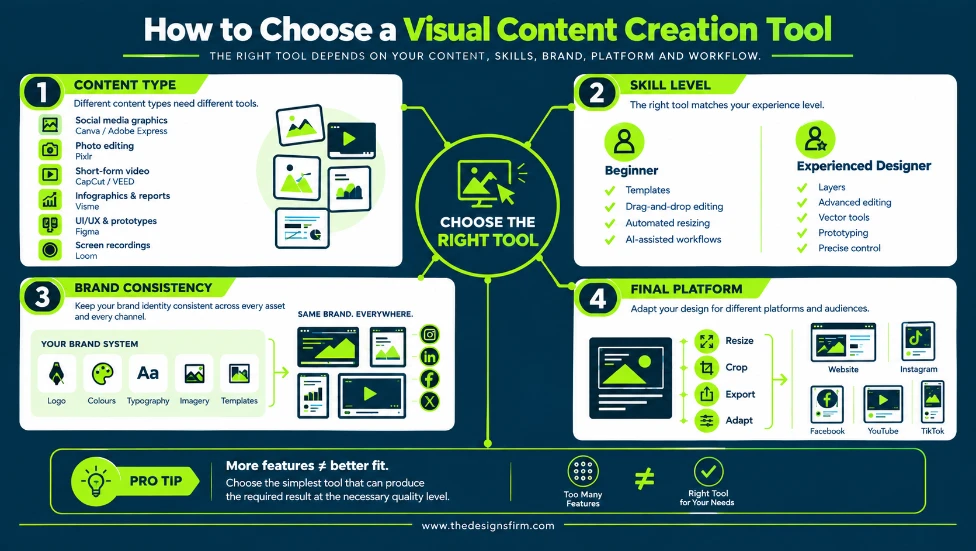
Consider the Type of Content
Different tools are built around different workflows:
- Social media graphics: Canva or Adobe Express
- Photo editing: Pixlr
- Short-form video: CapCut or VEED
- Infographics and reports: Visme
- UI/UX and prototypes: Figma
- Screen recordings: Loom
- Brand asset production: Canva or Adobe Express
A platform may offer many features, but more features do not automatically make it the right choice.
Consider Your Skill Level
Beginners often benefit from templates, drag-and-drop editors, automated resizing, and AI-assisted workflows. Experienced designers may need layers, advanced editing controls, vector tools, prototyping capabilities, or more precise control over individual design elements.
Consider Brand Consistency
If several people create content for the same company, brand management becomes especially important. Everything from your initial logo to your established brand color palettes, typography formats, imagery, and templates should be accessible from a central system.
This reduces the risk of producing content that looks inconsistent across different campaigns or channels. If your brand is just starting out and lacks these foundational assets, establishing a clear and consistent visual identity from the beginning can help ensure that all of your content feels cohesive and recognisable.
Consider the Final Platform
A design created for a website does not necessarily work well on Instagram, LinkedIn, YouTube, or TikTok. Because image dimensions and user expectations vary across different social media platforms, look for tools that can resize, crop, export, or adapt content accordingly.
Best Tools for Image and Graphic Design
Canva: A Versatile All-in-One Design Platform
Canva has evolved well beyond a basic template-based graphics editor. Its current platform covers social content, presentations, documents, websites, photo editing, video, and other visual workflows. Canva also offers AI-powered creation and editing features.
Its video editor includes a multi-layer timeline, caption generation, background removal, and AI-assisted editing.
For marketing teams, Canva is particularly useful when speed and consistency matter more than highly specialized design control.
We would consider it for:
- Social media graphics
- Blog graphics
- Presentations
- Marketing materials
- Simple videos
- Thumbnails
- Posters and flyers
- Branded templates
- Campaign assets
Canva’s Brand Kit can centralize logos, colors, fonts, imagery, templates, and other brand elements so teams can produce more consistent assets.
Best suited for: Marketing teams, small businesses, social media managers, and users who need to produce a wide variety of visual content quickly.
Adobe Express: Marketing Content With Adobe Ecosystem Support
Adobe Express combines graphic design, video creation, image editing, PDF tools, templates, and AI features in a browser-based workflow.
It can be particularly useful for teams that want access to Adobe’s broader ecosystem while working in a simpler interface than professional applications such as Photoshop or Illustrator.
Adobe Express also supports brand kits, allowing businesses to organize logos, colors, fonts, graphics, and templates.
We would consider Adobe Express when a business needs:
- Social media graphics
- Short videos
- Flyers and promotional materials
- Branded templates
- PDF editing
- AI-assisted visual creation
- Brand asset management
Best suited for: Businesses and marketing teams that want accessible design tools with strong branding capabilities.
Pixlr: Browser-Based Photo Editing
Pixlr focuses more heavily on image editing than broad marketing asset management. Its current platform includes AI photo editing, image generation, background removal, object removal, generative fill, image expansion, and other editing tools.
This makes it useful when you already have an image but need to modify or enhance it quickly without opening a complex desktop application.
Common applications include:
- Removing unwanted objects
- Removing backgrounds
- Improving image quality
- Adjusting compositions
- Creating image variations
- Generating new visual assets
- Preparing images for websites and social media
Best suited for: Marketers, content creators, and businesses that need flexible online photo editing without a heavyweight desktop workflow.
Best Tools for Video Creation and Editing
Video deserves special attention because of its growing role in digital marketing. Wyzowl’s 2026 research also highlights the increasing use and impact of video marketing, finding that 63% of video marketers had used AI video tools to create or edit marketing videos. The same research found that 82% of video marketers said video had helped increase web traffic, while 85% said it had helped generate leads.
These figures do not mean every business should produce more video without a strategy. Instead, they highlight the importance of having an efficient and sustainable approach to video production. Businesses need to consider which types of video align with their goals, where those videos will be used, and how they can consistently create content that keeps audiences engaged.
If producing live-action video isn’t feasible for your brand, you can always partner with an agency for custom video animation services to create highly engaging promotional content without ever needing a camera.
CapCut: Fast AI-Assisted Video Production
CapCut has developed into a broad video and creative platform with AI-powered tools for video editing, image generation, captions, voice, and other content workflows.
Its current AI features include tools for generating and editing video, adding captions, working with audio, and producing content from text or images. Some features vary by platform and region, so availability should be checked before building a workflow around a specific feature. For creators making fast-paced social content, knowing how to structure viral reel hooks is just as important as the software you choose.
CapCut is particularly useful for:
- Short-form social videos
- Reels and TikTok content
- Product videos
- Promotional videos
- Captioned content
- AI-assisted editing
- Image-to-video content
- Fast social content production
Best suited for: Social media teams, creators, marketers, and businesses producing frequent short-form video.
VEED: Browser-Based Video Editing for Marketing Teams
VEED is an online video editor built around quick editing and publishing. Its current feature set includes trimming, captions, audio cleanup, AI-assisted editing, B-roll insertion, text-based editing, video resizing, and AI video generation.
Its AI editing workflow can automatically remove filler words, clean audio, add subtitles, and insert B-roll. VEED also supports subtitle translation into more than 125 languages.
This makes it useful for marketing teams that need to turn raw footage into social-ready content without relying on traditional desktop video-editing software.
We would consider VEED for:
- Social media videos
- YouTube content
- Marketing videos
- Video podcasts
- Captioned videos
- Repurposing long-form content
- Multilingual video content
- Short promotional clips
Best suited for: Marketing teams and creators who want a browser-based video workflow with AI-assisted editing.
Best Tools for Infographics and Data Visualization
Visualizing information is different from simply designing a graphic. If the purpose of the content is to communicate statistics, processes, comparisons, or research, the tool needs to support information hierarchy and data presentation.
Creating these complex assets correctly can sometimes be overwhelming. In such cases, acquiring professional graphic design services can help you turn dense data into highly digestible visuals.
Visme: Infographics, Reports, and Data Visualization
Visme is built around visual communication and supports infographics, presentations, reports, charts, maps, interactive content, and other business visuals.
Its infographic platform includes statistical, process, timeline, comparison, geographic, and other layouts. Visme also supports more than 50 charts, graphs, data widgets, and maps, along with imports from Google Sheets and Excel.
Interactive elements such as links, animations, pop-ups, and hover effects can also be added to supported content.
This makes Visme particularly useful for:
- Infographics
- Annual reports
- Research presentations
- Statistical graphics
- Process diagrams
- Data-heavy marketing content
- Interactive visual content
- Business presentations
Best suited for: Marketing teams, researchers, educators, businesses, and organizations that need to turn complex information into structured visual content.
Why Data Visualization Needs More Than Attractive Design
A visually impressive infographic can still fail if the information is difficult to understand.
Good data visualization should:
- Establish a clear hierarchy.
- Highlight the most important numbers.
- Avoid unnecessary visual elements.
- Use consistent scales and labels.
- Make comparisons easy to understand.
- Keep the source and context of the data clear.
At The Design Firm, we treat an infographic as a communication asset rather than simply a decorated collection of statistics.
Best Tools for UI, UX, and Interactive Design
Figma: Collaborative Design and Prototyping
Figma occupies a different part of the visual content ecosystem. It is primarily a collaborative interface design and prototyping platform rather than a social media graphics tool.
Figma allows teams to design interfaces, create interactive prototypes, collaborate on designs, and prepare work for development. Its current platform also includes AI-assisted workflows and additional products for presentations, illustration, websites, and other creative tasks.
Its prototyping tools allow teams to create interactive experiences before development begins. This makes it valuable for testing navigation, interactions, layouts, and user flows before committing to production.
Figma is particularly useful for:
- Website UI design
- Mobile app design
- Wireframes
- Interactive prototypes
- Design systems
- Developer handoff
- Collaborative design reviews
- UX research workflows
Best suited for: UI/UX designers, product teams, web agencies, developers, and businesses building digital products.
Best Tools for Screen Recording and Visual Explanations
Loom: Screen Recording for Tutorials and Communication
Sometimes the most effective visual content is not a polished graphic or marketing video. A short screen recording can explain a process faster than several paragraphs of instructions.
Loom allows users to record their screen and camera, edit recordings, share them through links, and create GIF-based screen content. Its current features also include AI-generated titles, chapters, calls to action, and other productivity features.
This can be useful for:
- Product demonstrations
- Software tutorials
- Client instructions
- Internal training
- Customer support
- Website walkthroughs
- Bug demonstrations
- Quick presentations
For an agency, screen recording can be particularly useful when explaining technical updates to clients. For example, when we are providing ongoing website maintenance services, we often use short videos to visually demonstrate a backend change rather than typing out a lengthy technical explanation.
Best suited for: Agencies, SaaS businesses, customer-support teams, trainers, sales teams, and remote organizations.
How AI is Changing Visual Content Creation
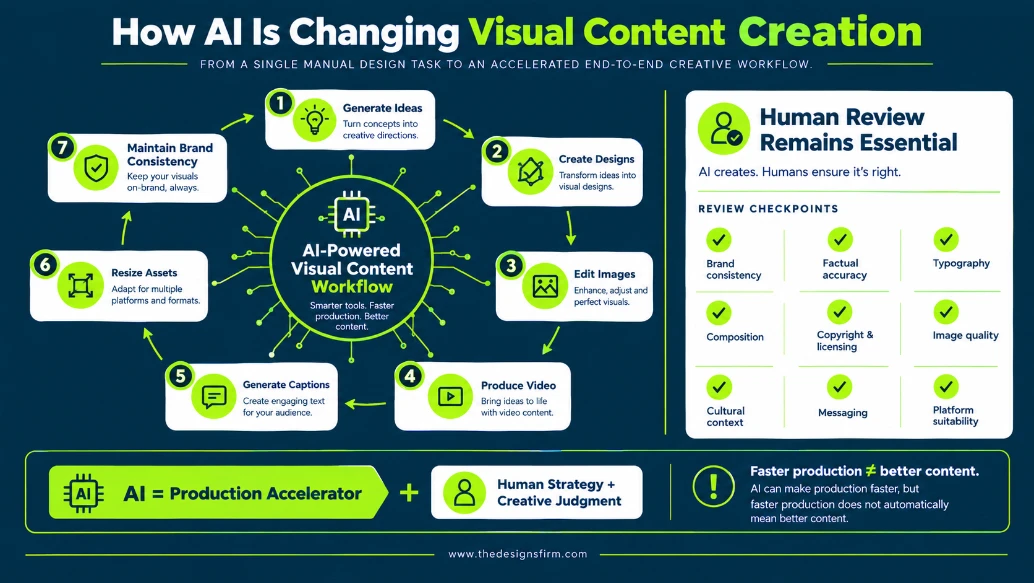
The growing scope of artificial intelligence is fundamentally changing the role of visual content creation tools.
Instead of using AI only to generate an isolated image, modern platforms increasingly use it across the workflow: generating ideas, creating designs, editing images, producing video, generating captions, resizing assets, and maintaining brand consistency.
Recent industry data found that over half of video marketers have already integrated AI video tools into their workflow to create or edit marketing videos.
However, faster production does not automatically mean better content.
AI-generated visual content still needs human review for:
- Brand consistency
- Factual accuracy
- Typography
- Composition
- Copyright and licensing considerations
- Image quality
- Cultural context
- Messaging
- Platform suitability
At The Design Firm, we see AI as a production accelerator rather than a replacement for strategy and creative judgment.
How to Build an Efficient Visual Content Workflow
Using several tools does not have to create a complicated workflow. The key is assigning each platform a clear role.
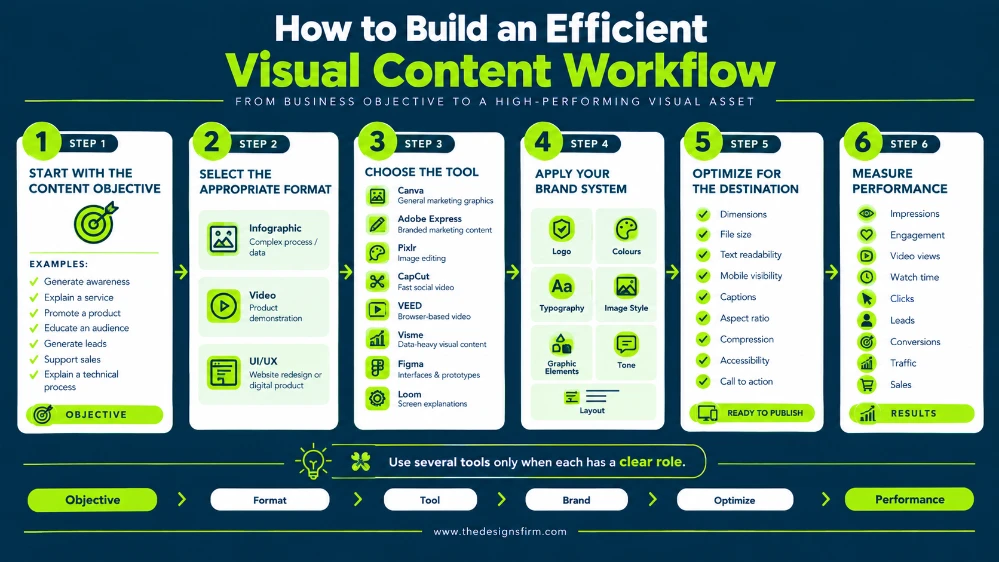
Step 1: Start With the Content Objective
Before choosing a platform, you must clearly define your target audience and determine what the asset needs to achieve.
For example:
- Generate awareness
- Explain a service
- Promote a product
- Educate an audience
- Generate leads
- Support sales
- Explain a technical process
Step 2: Select the Appropriate Format
Choose the format based on the objective rather than personal preference.
A complex process might work better as an infographic, while a product demonstration may need video. If you are going through a full website redesign, you will need dedicated UI/UX planning. Should you require technical execution for these designs, our agency offers professional custom web development services to build out the final functional platform.
Step 3: Choose the Tool
Use the simplest tool that can produce the required result at the necessary quality level.
For example:
- Canva for general marketing graphics
- Adobe Express for branded marketing content
- Pixlr for image editing
- CapCut for fast social video
- VEED for browser-based video workflows
- Visme for data-heavy visual content
- Figma for interfaces and prototypes
- Loom for screen-based explanations
Step 4: Apply Your Brand System
Use consistent:
- Logos
- Colors
- Typography
- Image styles
- Graphic elements
- Tone
- Layout conventions
A collection of individually attractive designs can still look unprofessional if they do not feel like they belong to the same brand.
Step 5: Optimize for the Destination
Before publishing, check the asset against its intended platform.
Review:
- Dimensions
- File size
- Text readability
- Mobile visibility
- Captions
- Aspect ratio
- Compression
- Accessibility
- Call to action
Step 6: Measure Performance
Visual content should ultimately support a business goal, such as increasing lead generation or improving your overall conversion rate.
Depending on the asset, track:
- Impressions
- Engagement
- Video views
- Watch time
- Clicks
- Leads
- Conversions
- Traffic
- Sales
For example, Wyzowl found that video marketers commonly measure video ROI through views, engagement, leads and clicks, customer engagement, brand awareness, and sales.
Common Mistakes to Avoid
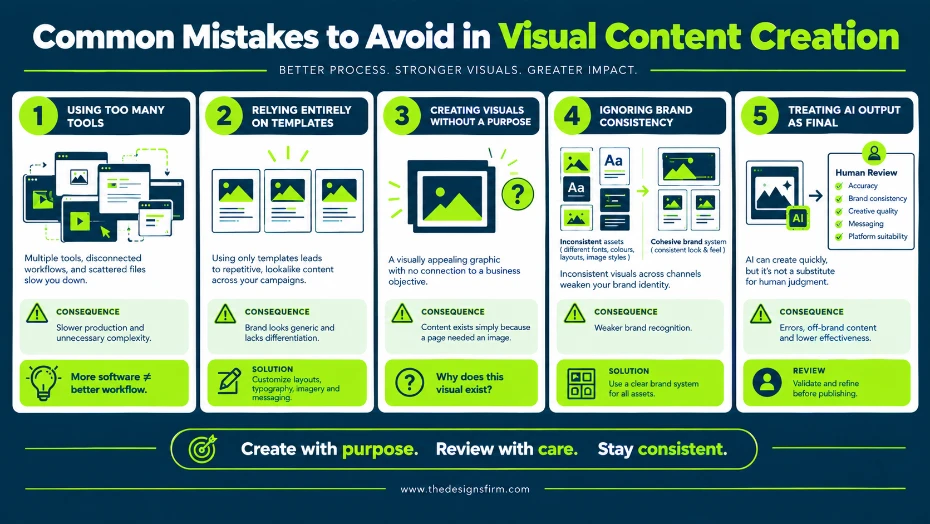
Using Too Many Tools
More software does not necessarily mean a better workflow. If your team switches between multiple platforms for simple tasks, production can become slower rather than faster.
Relying Entirely on Templates
Templates are useful for speed, but excessive reliance on them can make a brand look generic. Customize layouts, typography, imagery, and messaging to fit the brand.
Creating Visuals Without a Purpose
Every asset should answer a basic question: Why does this visual exist?
If the answer is simply “because the page needed an image,” your underlying content creation strategy probably needs improvement.
Ignoring Brand Consistency
Different fonts, colors, layouts, and image styles across channels can weaken brand recognition.
Treating AI Output as Final
AI can produce a useful first draft, but generated content should be reviewed before publication. Human oversight remains important for both creative quality and factual accuracy.
How The Design Firm Can Help With Visual Content
Choosing a tool is only one part of creating effective visual content.
At The Design Firm, we can support businesses with the strategy, design, production, and distribution required to turn visual content into a highly useful marketing asset. If you are looking for an all-in-one solution, our professional digital marketing agency in Karachi, can handle everything from strategy to execution. Our team provides visual content capabilities that can include:
- Social media graphics
- Infographics
- Brand assets
- Presentation design
- Website graphics
- UI/UX design
- Promotional videos
- Motion graphics
- Explainer videos
- Marketing creatives
- Visual content for SEO and digital campaigns
The objective is not simply to produce more visuals. It is to create content that communicates clearly, fits the brand, works on the intended platform, and supports your wider business goals. We highly recommend developing a comprehensive digital marketing strategy to ensure every piece of content actively contributes to your bottom line.
Conclusion
The best visual content creation tool depends on what you are trying to produce. Canva and Adobe Express can handle broad marketing design requirements, Pixlr is useful for image editing, CapCut and VEED support modern video workflows, Visme focuses on infographics and data visualization, Figma supports interface design and prototyping, and Loom is useful for screen-based communication.
The important decision is not choosing the tool with the longest feature list. It is choosing the tool that fits your workflow, audience, content format, brand requirements, and marketing objective.
At The Design Firm, we combine technology with strategy and creative expertise to produce visual content that does more than look good. We create visual assets designed to communicate, engage, and support measurable marketing goals.